Set Up IPTV on MAG Box – Quick Guide 2026

This quick guide explains how to set up IPTV on a MAG box using the Stalker Portal method.
It works with all major MAG models including MAG 254, MAG 256, MAG 322, MAG 524, and newer devices.

Step 1 – Send Your MAG IPTV Box Information

To activate IPTV on your MAG device, you must provide the following details:
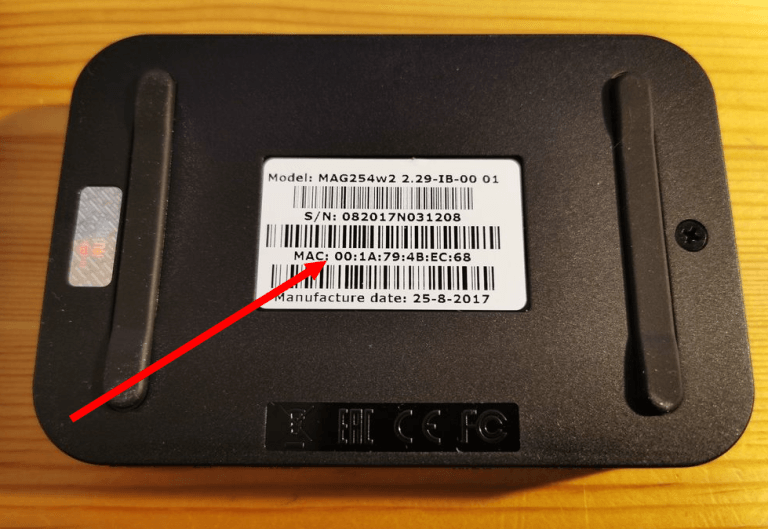
  • MAC address of your MAG box

  • Order ID or payment reference

  • Device model (MAG 254 / 256 / 322 / etc.)

  • Connection type (WiFi or Ethernet)

Step 2 – Configure Portal on MAG Box

After you receive your IPTV portal URL, follow these steps:
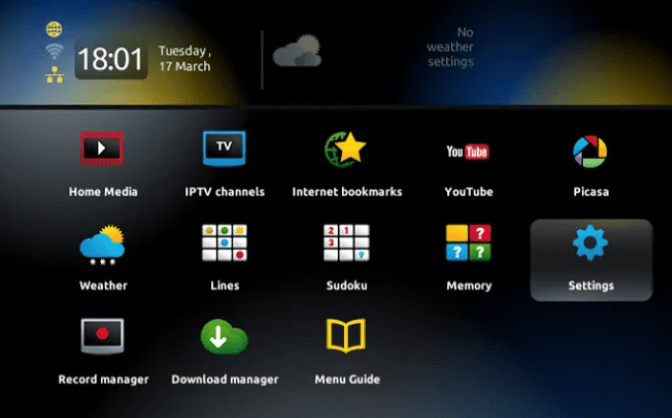
  1. Go to Settings

  2. Select System Settings

  3. Choose Servers

  4. Open Portals

  5. Enter:

    • Portal URL (must start with http://)

    • Portal name (any name)

  6. Press OK to save

This connects your MAG IPTV box to your IPTV service.

Step 3 – Complete IPTV Setup on MAG Box

  1. Check all settings

  2. Exit to the main menu

  3. Restart your MAG box

    • Power off

    • Wait 30 seconds

    • Power on again

Your IPTV on MAG box is now ready.

Tips for Better MAG IPTV Streaming

  • Use Ethernet for best performance

  • Keep a stable internet connection

  • Make sure your MAG IPTV box is updated

  • Keep good ventilation for the device

Troubleshooting MAG IPTV

If IPTV does not load:

  • Check your internet connection

  • Verify your MAC address

  • Make sure the portal URL starts with http://

If you see “Authorization Failed”:

  • Re-check all details

  • Turn off VPN if active

  • Contact support if the issue continues


Request a Free IPTV Trial

Enter your email to request a free IPTV trial.
You will receive a confirmation email to verify your address before we send your trial details.

Newsletter Form (#4)
Support
Live Chat Online

Support & Free Trial

Contact us for technical support
or to request a free IPTV trial.

WhatsApp Support
Fast Support
Telegram Support
Fast Support
Live Chat
Fast Support
Email Support
Slower Response