How to Install Hot Player on Samsung & LG Smart TVs

This guide explains how to install and activate Hot Player IPTV on Samsung and LG Smart TVs in a few simple steps.

Step 1 – Install Hot Player on Samsung / LG TV

On Samsung TV (Tizen)

1. Open Samsung Smart Hub.

2. Go to Apps.

3. Search for Hot Player IPTV or Hot IPTV.
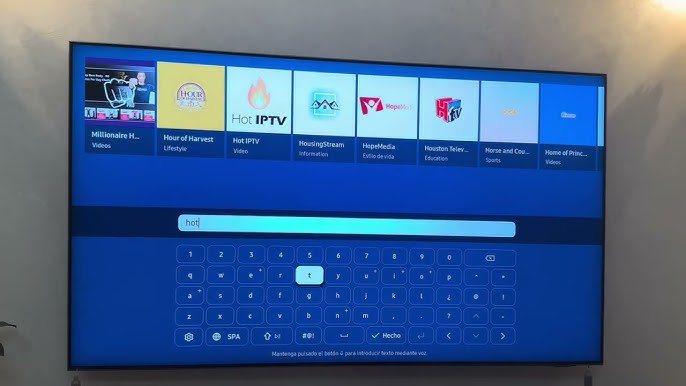
4. Select the app and click Install.

On LG TV (webOS)

1. Open LG Content Store.

2. Search for Hot Player IPTV.

3. Select the app and click Install.

Step 2 – Open Hot IPTV App

After installation:

1. Open Hot Player IPTV.

2. The app will display your MAC Address on the screen.
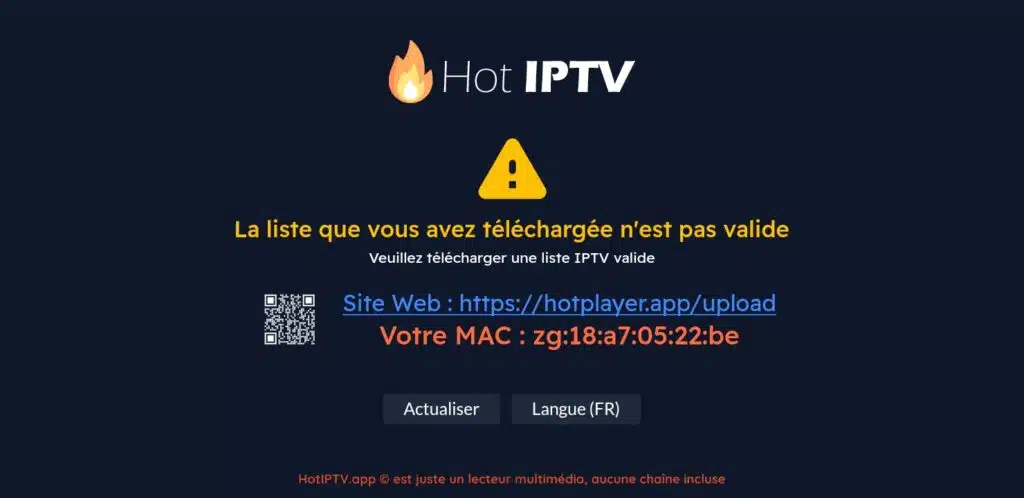
3. Keep this MAC address safe — you’ll need it for activation

This code links your device to your IPTV account.

Step 3 – Activate Hot IPTV Using MAC Address

To start using Hot IPTV, the player must be activated with your device MAC address.

You have two simple options:

Option 1 – Send MAC Address to Support

  • Copy the MAC Address shown in the app

  • Send it to the support team

  • Activation is completed for you instantly

No technical steps required.

Option 2: Activate Hot IPTV Yourself

1. Open this page in your browser:
👉 https://hotplayer.app/upload

2. Enter your MAC Address.
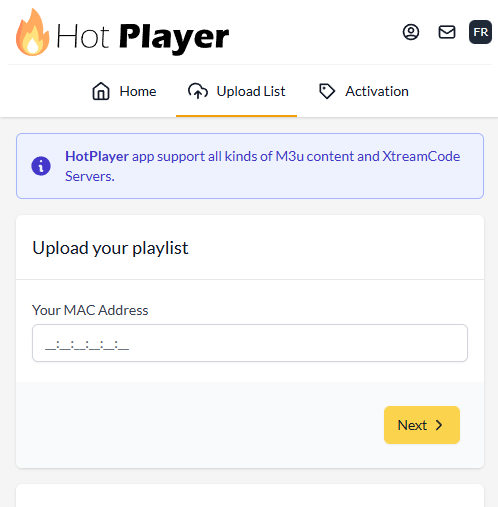
3. Submit the form.

Your Hot IPTV activation will finish within seconds.

Step 3 – Add M3U Playlist to Hot IPTV

Once activation is done, it’s time to add your IPTV playlist.

1. Choose M3U as your setup method.
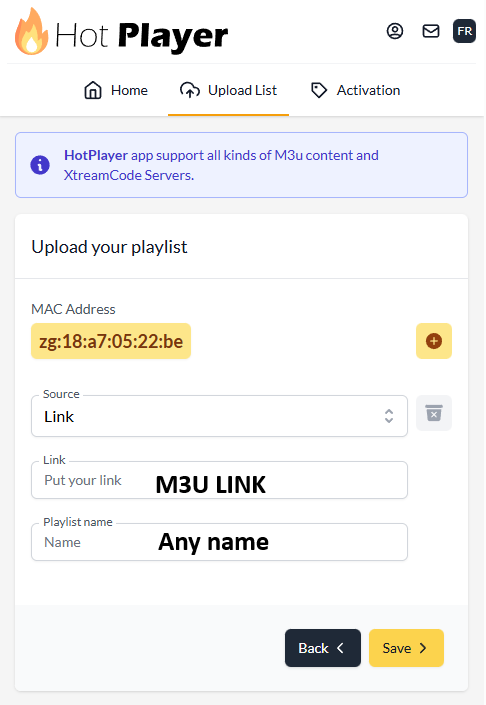
2. Enter the following:

  • Playlist Name

  • M3U URL (provided after subscription)

3. Save your settings

This connects your IPTV service to the Hot Player app.

Why Choose Hot IPTV?

Hot IPTV is one of the easiest IPTV players available. It’s designed for beginners and advanced users alike.

Key advantages:

  • Fast MAC-based activation

  • Simple M3U playlist support

  • Smooth performance on phones, TV boxes, and smart TVs

  • Clean and easy interface

It works perfectly as a:

  • Hot IPTV player

  • Hot Player IPTV app

  • Reliable streaming solution for IPTV users

Common Hot IPTV Problems & Fixes

🔹 Stream failed

  • Check your internet connection

  • Reload the playlist

  • Verify your M3U link is valid

🔹 App not working

  • Restart the app

  • Clear cache:
    Settings → Apps → Hot IPTV → Clear Cache

🔹 Activation not completed

Can I Use Hot IPTV on Other Devices?

Yes. Hot IPTV also works on:

  • Smart TVs

  • Android TV boxes

  • Fire TV Stick (via APK installation)

  • Some Samsung & LG TVs

If you’re searching for Hot IPTV on Firestick or Hot IPTV for Samsung TV, the same MAC activation method applies.


Richiedi una prova IPTV gratuita

Inserisci la tua email per richiedere una prova IPTV gratuita
Riceverai un’e-mail di conferma per verificare il tuo indirizzo prima che inviamo i dettagli della prova.

Newsletter Form (#4)
Support
Chat dal vivo Online

Supporto e prova gratuita

Contattaci per supporto tecnico
o per richiedere un prova IPTV gratuita.

Supporto WhatsApp
Supporto rapido
Supporto Telegram
Supporto rapido
Chat dal vivo
Supporto rapido
Supporto via e-mail
Risposta più lenta