How to Install IPTV Smarters Pro on Windows PC

This guide explains how to install IPTV Smarters Pro on a Windows PC directly from the Microsoft Store. No emulator is required — the app runs natively on Windows 10 and Windows 11.

Step 1 – Install IPTV Smarters Pro on Windows

You can install the app in

  1. Open this link:
    Download IPTV Smarters Pro 1.1.2

  2. Click Get.

  3. Install the app on your PC.

How to Set Up IPTV Smarters Pro

After installing the app, follow these setup steps:

1. Launch IPTV Smarters Pro
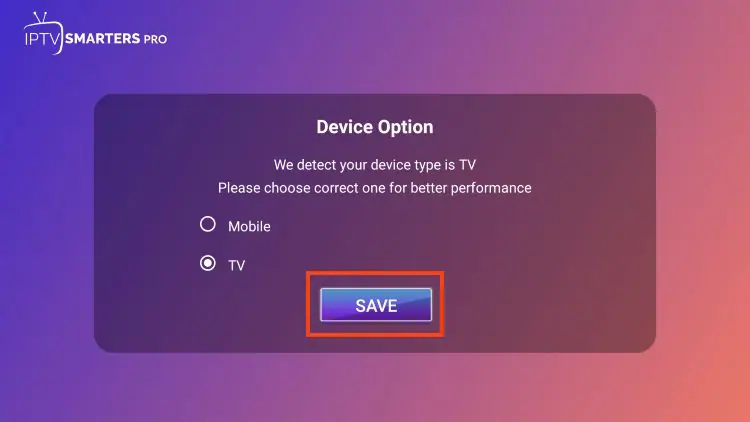
2. Choose your device type

3. Select TV (for Firestick / Android TV / Google TV)

4. Click Save

5. Read the notice that Smarters Pro does not provide content

6. Click Accept

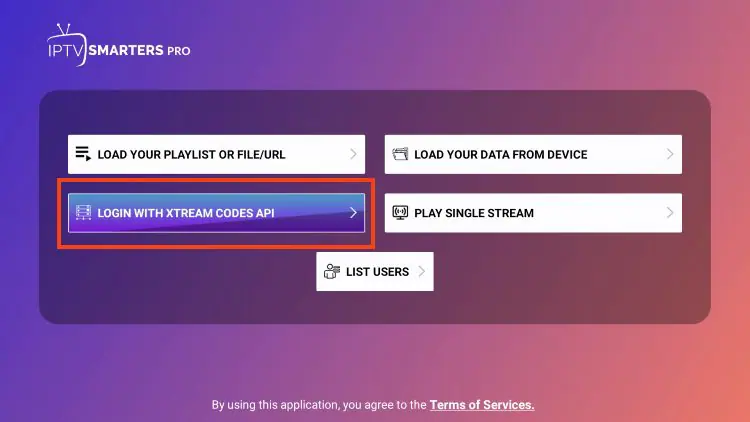
You’ll now be asked to choose your login method.

Login with Xtream Codes API (Recommended)

1. Select Login with Xtream Codes API
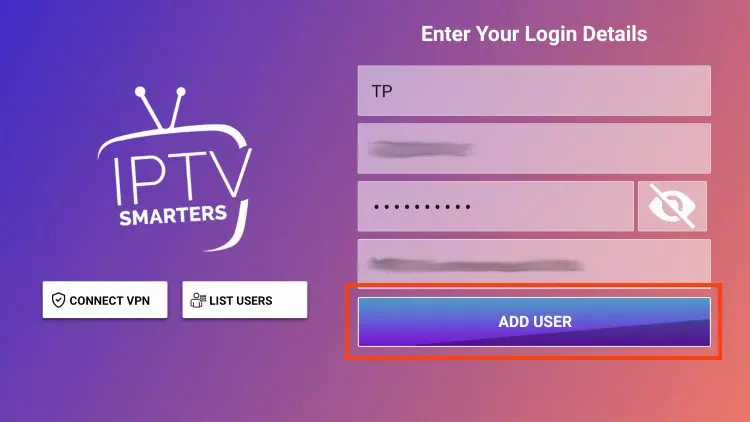
2. Enter the following details provided by your IPTV service:

  • Server URL

  • Username

  • Password

3. Click Add User

4. Wait for the confirmation message

Can I Use IPTV Smarters Pro on Other Devices?

Yes — IPTV Smarters Pro works on many platforms besides Android.

Supported devices include:

  • Smart TVs

  • Android TV boxes

  • Fire TV Stick (via APK on Amazon devices)

  • Phones and tablets

If you’re searching for IPTV Smarters Pro for Smart TVs or IPTV Smarters Pro on Firestick, the setup steps are the same — just log in using your IPTV credentials and the app will load your content automatically.


Support
Chat en direct En ligne

Support & essai gratuit

Contactez-nous pour support technique
ou pour demander un essai IPTV gratuit.

Support WhatsApp
Support rapide
Support Telegram
Support rapide
Chat en direct
Support rapide
Support par e-mail
Réponse plus lente